
Data Entry / Typing Practice Tool for PA/SA & Postman Exams – Download & Setup Guide
Procedure to download and unzip the application
- Download the RAR file from the above link
- Unzip this RAR file using Winrar or 7-Zip tools
- This will extract folders and file
- Go through the SOP and proceed to practice DEST exam
Note: The tool works only on Desktop or Laptop. It cannot run on mobile phones or tablets.
Download PRACTICE TOOL FOR PA/SA DEST EXAMINATION
Download PRACTICE TOOL FOR MTS/POSTMAN DEST EXAMINATION
Next Steps for Students
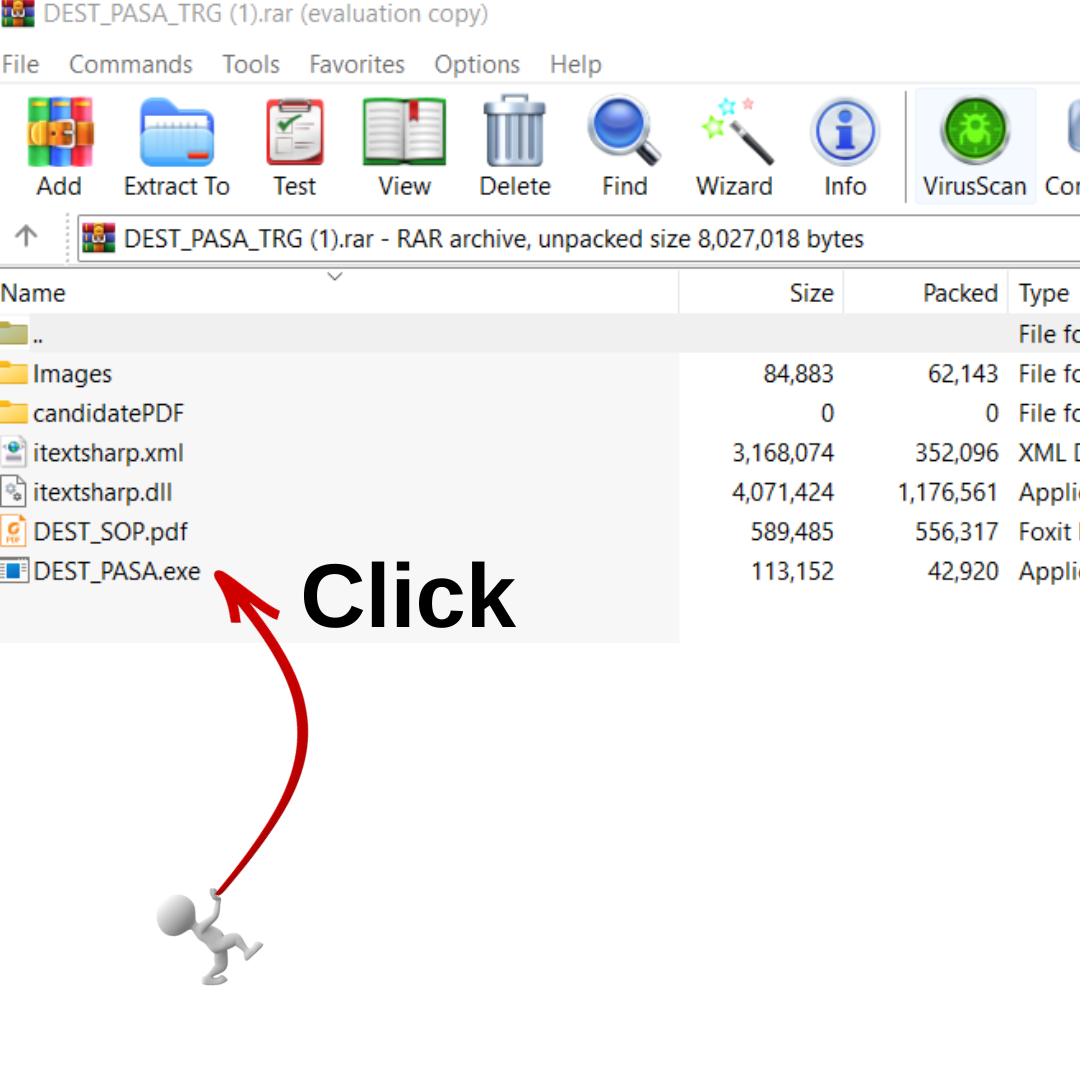
Locate the File
It should be on the Desktop (as shown) or in the Downloads folder.
Right-Click on the RAR File
Choose “Extract Here” or “Extract to DEST_PASA…” (depending on your extraction tool).
Wait for Extraction
A new folder will appear with all necessary files.
Open the SOP
Read instructions before running the application.
Run the Practice Tool
Double-click the
.exefile inside the extracted folder to start.
Data Entry Skill Test (DEST) – Quick Guide for Students
1. Purpose of DEST
- Conducted for candidates who qualified in Paper I & Paper II of LDCE for PA/SA recruitment.
- Tests your typing speed & accuracy in 15 minutes.
2. Key Features
- Offline Application – No internet required.
- Works only on Desktop/Laptop.
- Timer – 15 minutes.
- Key Depressions – 600 (±5%) for 25 marks.
- Case Sensitive – Type exactly as shown (Capital/Small letters).
3. Qualifying Marks
- General: 50% (12.5 marks)
- OBC/EWS: 45% (11.25 marks)
- SC/ST: 40% (10 marks)
- PWD: 40% (10 marks)
4. How to Start the Test
- Open the DEST application on your desktop.
- Enter your Roll Number, Name & Community correctly.
- Read instructions carefully & tick the checkbox.
- Click Start Test to begin (timer starts immediately).
5. Typing Process
- Two windows appear:
- Top window: Sentence from the master paragraph.
- Bottom window: Type the sentence.
- After typing:
- Put a full stop (dot) at the end of each sentence.
- Click Next Sentence to move ahead.
- At least 5 key presses are required for each sentence.
- After last sentence:
- Click Review Paragraph to see full text.
- Correct errors using arrow keys, mouse & delete.
6. Restrictions
- Backspace button is disabled to avoid accidental deletion.
- Extra spaces, tab, enter keys are ignored in evaluation.
7. Submission
- Test auto-submits when 15 minutes are over.
- Evaluated Answer Sheet (PDF) is generated with:
- Name, Roll Number, Community, Date/Time.
- Marks and percentage scored.
- Printout is taken & signed by Candidate & Supervisor before leaving.
8. Evaluation Logic
- System checks each word typed against master paragraph.
- Correctly matched words get marks.
- Extra/unmatched words are ignored (no negative marking).
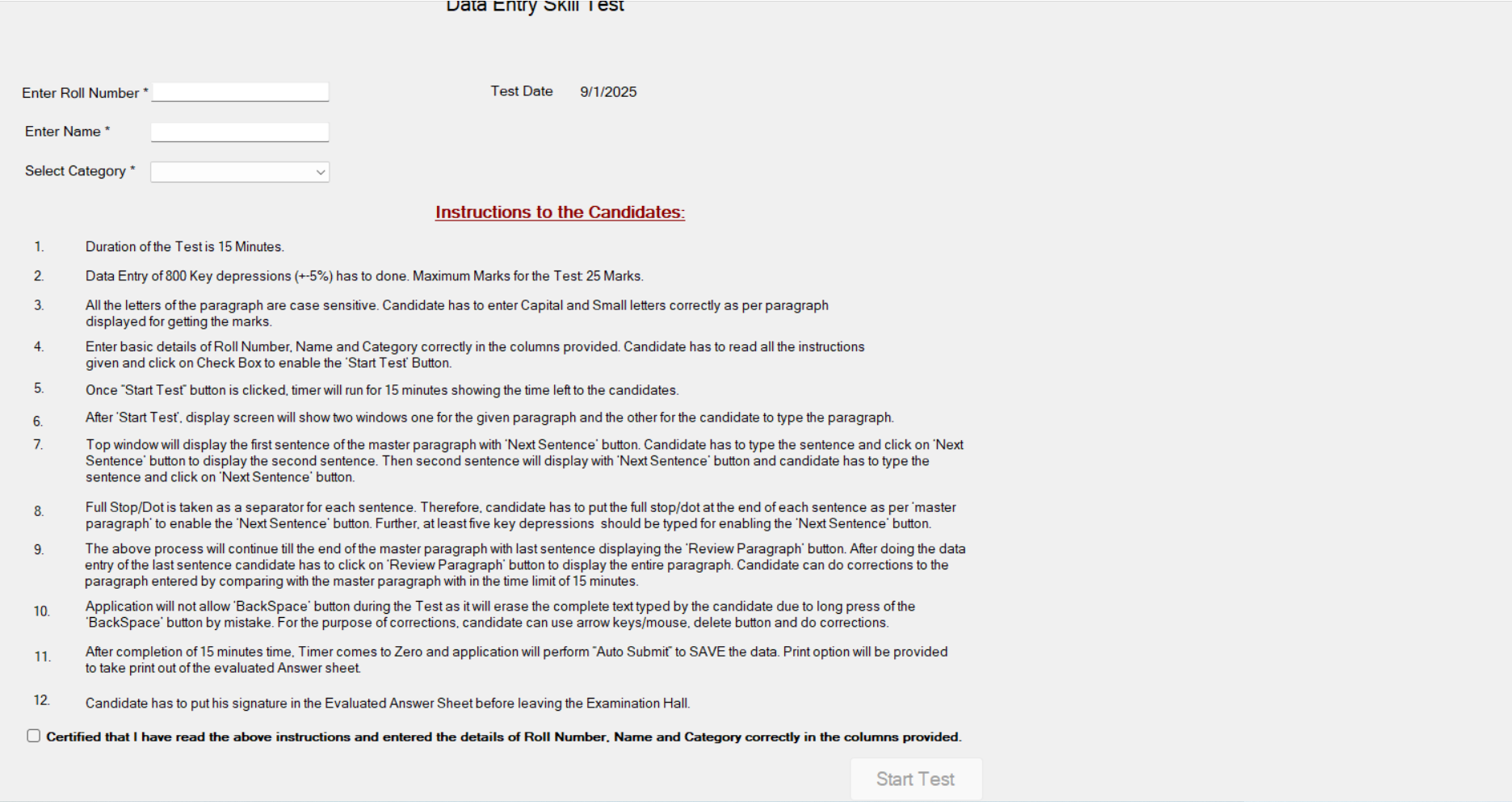
Enter your Roll Number (any ) not Exact
And Name
And select your category (GEN/EWS/OBC/SC/ST/PWD)
SELECT THE BUTTON AND FINNALLY CLICK START TEST
Certified that I have read the above instructions and entered the details of Roll Number, Name and Category correctly in the columns provided.
Start Test
Data Entry / Typing Practice Tool for PA/SA & Postman Exam
Data Entry / Typing Practice Tool for PA/SA & Postman...
Read More V V Academy
Telangana Postal Circle GDS/MTS to Postman Question Paper 31-08-2025
TELANGANA POSTAL CIRCLE PAPER PAPER-1 PDF Click Here Paper-I: Basic...
Read MoreV V Academy
GDS / MTS to Postman & Mail Guard Question Papers with Answer Key – All 23 Circles (31-08-2025)
AP CIRCLE QUESTION PAPER-I WITH KEY <!doctype html> AP Circle...
Read MoreV V Academy
Post Office Savings Schemes Table
Lor Post Office Savings Account (SB) — Scheme Details Post...
Read MoreV V Academy
Data Entry / Typing Practice Tool for PA/SA & Postman Exams – Download & Setup Guide
Procedure to download and unzip the application
- Download the RAR file from the above link
- Unzip this RAR file using Winrar or 7-Zip tools
- This will extract folders and file
- Go through the SOP and proceed to practice DEST exam
Note: The tool works only on Desktop or Laptop. It cannot run on mobile phones or tablets.
Download PRACTICE TOOL FOR PA/SA DEST EXAMINATION
Download PRACTICE TOOL FOR MTS/POSTMAN DEST EXAMINATION
Next Steps for Students
Locate the File
It should be on the Desktop (as shown) or in the Downloads folder.
Right-Click on the RAR File
Choose “Extract Here” or “Extract to DEST_PASA…” (depending on your extraction tool).
Wait for Extraction
A new folder will appear with all necessary files.
Open the SOP
Read instructions before running the application.
Run the Practice Tool
Double-click the
.exefile inside the extracted folder to start.
Data Entry Skill Test (DEST) – Quick Guide for Students
1. Purpose of DEST
- Conducted for candidates who qualified in Paper I & Paper II of LDCE for PA/SA recruitment.
- Tests your typing speed & accuracy in 15 minutes.
2. Key Features
- Offline Application – No internet required.
- Works only on Desktop/Laptop.
- Timer – 15 minutes.
- Key Depressions – 600 (±5%) for 25 marks.
- Case Sensitive – Type exactly as shown (Capital/Small letters).
3. Qualifying Marks
- General: 50% (12.5 marks)
- OBC/EWS: 45% (11.25 marks)
- SC/ST: 40% (10 marks)
- PWD: 40% (10 marks)
4. How to Start the Test
- Open the DEST application on your desktop.
- Enter your Roll Number, Name & Community correctly.
- Read instructions carefully & tick the checkbox.
- Click Start Test to begin (timer starts immediately).
5. Typing Process
- Two windows appear:
- Top window: Sentence from the master paragraph.
- Bottom window: Type the sentence.
- After typing:
- Put a full stop (dot) at the end of each sentence.
- Click Next Sentence to move ahead.
- At least 5 key presses are required for each sentence.
- After last sentence:
- Click Review Paragraph to see full text.
- Correct errors using arrow keys, mouse & delete.
6. Restrictions
- Backspace button is disabled to avoid accidental deletion.
- Extra spaces, tab, enter keys are ignored in evaluation.
7. Submission
- Test auto-submits when 15 minutes are over.
- Evaluated Answer Sheet (PDF) is generated with:
- Name, Roll Number, Community, Date/Time.
- Marks and percentage scored.
- Printout is taken & signed by Candidate & Supervisor before leaving.
8. Evaluation Logic
- System checks each word typed against master paragraph.
- Correctly matched words get marks.
- Extra/unmatched words are ignored (no negative marking).
Enter your Roll Number (any ) not Exact
And Name
And select your category (GEN/EWS/OBC/SC/ST/PWD)
SELECT THE BUTTON AND FINNALLY CLICK START TEST
Certified that I have read the above instructions and entered the details of Roll Number, Name and Category correctly in the columns provided.
Start Test